Why use it
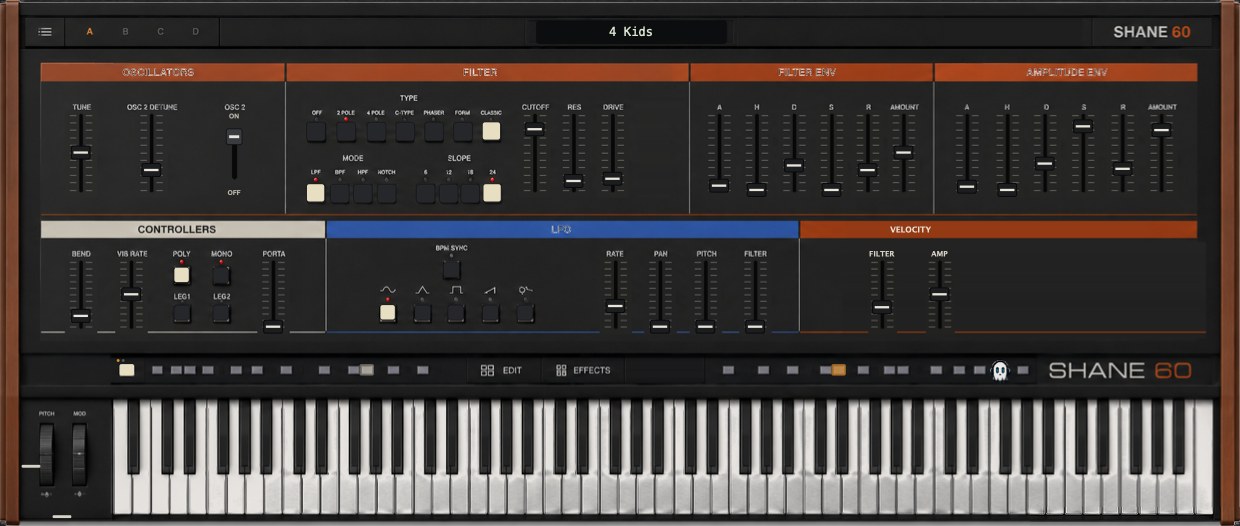
What it doesA sampled vintage polysynth with a filter section you can reshape.
Reach for it whenPads and chord stabs. Basses that need a bit of analogue drift.
What makes it differentSeven filter types including phaser and formant modes, and presets tuned to sit on the octave.
September sale: 30% off until September 30 - use code SEPT30 at checkout.
A sampled vintage polysynth with a filter section you can reshape — seven filter types including a phaser and a formant mode.
Presets are tuned to whole octaves against the source recordings rather than to the nearest cent, so patches stay in tune with each other when you layer them.
CONTROLS
· OSC2         second layer
· FILTER TYPE  Off · 2 Pole · 4 Pole · C-Type · Phaser · Form · Classic
· FILTER MODE  LPF · BPF · HPF · Notch
· FILTER SLOPE
· LFO WAVE · LFO SYNC
· PLAY MODE
· CHORUS
WHAT'S NEW IN 1.6
· Preset tuning: SFZ tune/transpose is now read, so every preset sits on the octave (4 Kids and J6 Chunk were up to 145 cents off)
· Rebuilt, re-signed and notarized for macOS (Universal) and Windows
REGISTRATION
· The plug-in runs unrestricted for a 3-day trial from first launch.
· Your licence key is on your Gumroad receipt and on the download page.
· Paste it into the plug-in once — it needs internet that one time, then works offline.
· Message me on Gumroad if you need it reset for a new machine.
FORMATS
macOS AU + VST3 + AAX (Pro Tools), Universal (Intel + Apple Silicon) Windows VST3 + AAX (Pro Tools), 64-bit
INSTALL — WINDOWS
1. Unzip.
2. Copy "Shane 60.vst3" to:
   C:\Program Files\Common Files\VST3
3. Restart your DAW and rescan plugins.
INSTALL — macOS
1. Open the .pkg installer and follow the prompts.
2. Pick the formats you want (VST3 / AU / AAX).
3. Restart your DAW and rescan plugins.
Signed with a Developer ID and notarized by Apple — no security warnings, no Terminal commands.
Stuck, or something sounds off? Message me — I answer every one.
More plugins coming, posted gradually.
UPDATES
Buy once, updated forever. Every future build is free to you — Gumroad emails you when there is a new one. No subscription, no upgrade fee, no re-purchase.
FOLLOW ALONG
New plugins and what goes into them: