Why use it
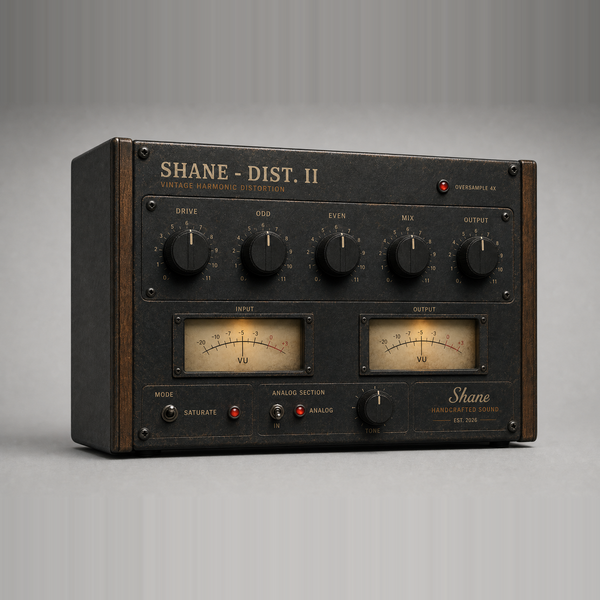
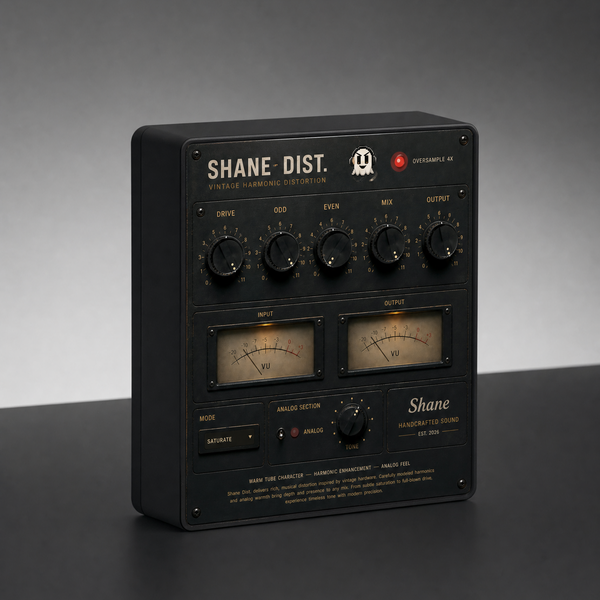
What it doesOdd and even harmonics on separate knobs, with three voicings and a wet/dry mix.
Reach for it whenBass that needs to cut on small speakers. Vocals that need grit. Drums that need edge.
What makes it differentEven thickens, odd hardens - you dial the ratio rather than picking a flavour. Mix lets you push hard and keep the source.
September sale: 30% off until September 30 - use code SEPT30 at checkout.
Odd and even harmonics on separate knobs, three voicings, and a wet/dry mix
so you can push it hard without losing the source.
CONTROLS
· DRIVE how hard you push the circuit
· ODD odd harmonics — edgy, aggressive
· EVEN even harmonics — warm, tube-like
· MIX blend the distorted signal against the dry
· OUTPUT final level
· MODE FUZZ / SATURATE / DISTORT
· ANALOG analog character section with TONE
· 4x oversampling
· Input and output VU metering
The bypass A/B in the demo video is level-matched — no volume trick.
WHAT'S NEW IN 1.6
· Odd/even harmonic voicing fixed (same fix as Dist II)
· Rebuilt, re-signed and notarized for macOS (Universal) and Windows
REGISTRATION
· The plug-in runs unrestricted for a 3-day trial from first launch.
· Your licence key is on your Gumroad receipt and on the download page.
· Paste it into the plug-in once — it needs internet that one time, then works offline.
· Message me on Gumroad if you need it reset for a new machine.
FORMATS
macOS AU + VST3 + AAX (Pro Tools), Universal (Intel + Apple Silicon)
Windows VST3 + AAX (Pro Tools), 64-bit
INSTALL — WINDOWS
1. Unzip.
2. Copy "Shane Dist.vst3" to:
C:\Program Files\Common Files\VST3
3. Restart your DAW and rescan plugins.
INSTALL — macOS
1. Open the .pkg installer and follow the prompts.
2. Pick the formats you want (VST3 / AU / AAX).
3. Restart your DAW and rescan plugins.
Signed and notarized by Apple — no Terminal, no security workaround.
The installer asks for your admin password because the plug-ins go to /Library/Audio/Plug-Ins (available to every user on the Mac).
Signed and notarized by Apple — no Terminal, no security workaround.
The installer asks for your admin password because the plug-ins go to /Library/Audio/Plug-Ins (available to every user on the Mac).
Stuck, or something sounds off? Message me — I answer every one.
First of a set. More coming.
UPDATES
Buy once, updated forever. Every future build is free to you — Gumroad emails you when there is a new one. No subscription, no upgrade fee, no re-purchase.
FOLLOW ALONG
New plugins and what goes into them: