Why use it
What it doesAn octave-up sheen that builds as the tail decays, rather than appearing all at once.
Reach for it whenPads and ambient beds. A held vocal line. Clean guitar that needs to sound wide.
What makes it differentShimmer amount, reverb time and tone are independent. Six-stage diffusion, so the tail is smooth from the first millisecond.
September sale: 30% off until September 30 - use code SEPT30 at checkout.
A shimmer reverb. Feed the tail back an octave up and let it climb — from a
thin halo over a vocal to a cathedral that never quite stops.
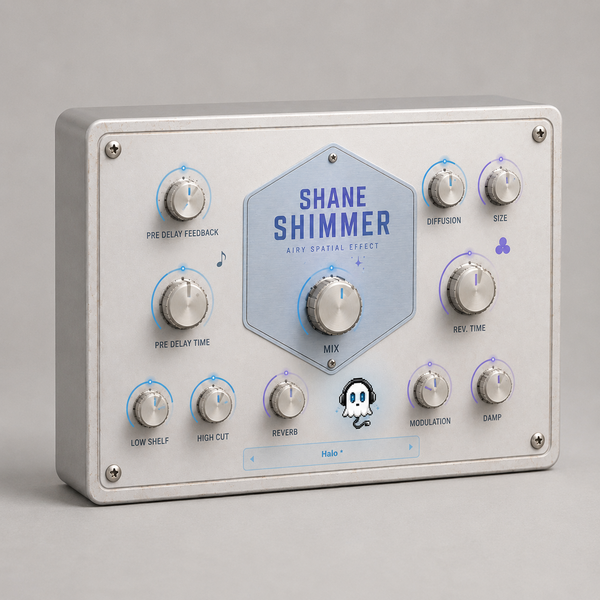
REVERB
· SIZE 0.35 to 2.0
· REV. TIME 0.2 seconds to 20
· DIFFUSION from discrete echoes to a smooth wash
· DAMP how fast the top comes off
· MODULATION keeps the tail from standing still
SHIMMER
· REVERB the amount of octave-up feedback — this is the shimmer
PRE DELAY
· TIME 0 to 500 ms, or lock it to your project tempo
· FEEDBACK up to 0.9, so the pre-delay repeats before the tail even starts
OUTPUT
· LOW SHELF -24 to +6 dB
· HIGH CUT 1 kHz to 20 kHz
· MIX dry to fully wet
PRESETS
Halo · Cathedral · Ice Chapel · Endless Rise · Snow Pad · Vocal Air
Guitar Bloom · Octave Wash · Small Glass · Drone Bed · Ghost Trail
Dry Sparkle
Watch the ghost in the middle — it rises as the tail blooms and settles
back down when it fades.
WHAT'S NEW IN 1.6
· Rebuilt, re-signed and notarized for macOS (Universal) and Windows
REGISTRATION
· The plug-in runs unrestricted for a 3-day trial from first launch.
· Your licence key is on your Gumroad receipt and on the download page.
· Paste it into the plug-in once — it needs internet that one time, then works offline.
· Message me on Gumroad if you need it reset for a new machine.
FORMATS
macOS AU + VST3 + AAX (Pro Tools), Universal (Intel + Apple Silicon)
Windows VST3 + AAX (Pro Tools), 64-bit
INSTALL — WINDOWS
1. Unzip.
2. Copy "Shane Shimmer.vst3" to:
C:\Program Files\Common Files\VST3
3. Restart your DAW and rescan plugins.
INSTALL — macOS
1. Open the .pkg installer and follow the prompts.
2. Pick the formats you want (VST3 / AU / AAX).
3. Restart your DAW and rescan plugins.
Signed and notarized by Apple — no Terminal, no security workaround.
The installer asks for your admin password because the plug-ins go to /Library/Audio/Plug-Ins (available to every user on the Mac).
Signed with a Developer ID and notarized by Apple — no security
warnings, no Terminal commands.
Stuck, or something sounds off? Message me — I answer every one.
More plugins coming, posted gradually.
UPDATES
Buy once, updated forever. Every future build is free to you — Gumroad emails you when there is a new one. No subscription, no upgrade fee, no re-purchase.
FOLLOW ALONG
New plugins and what goes into them: