Why use it
What it doesA flanger with a real through-zero mode - the notch walks straight through DC.
Reach for it whenJet sweeps on drums and guitars. Subtle doubling at low depth.
What makes it differentBoth paths move, which is what makes the zero crossing possible; the depth of the notch is set by how exactly they cancel.
September sale: 30% off until September 30 - use code SEPT30 at checkout.
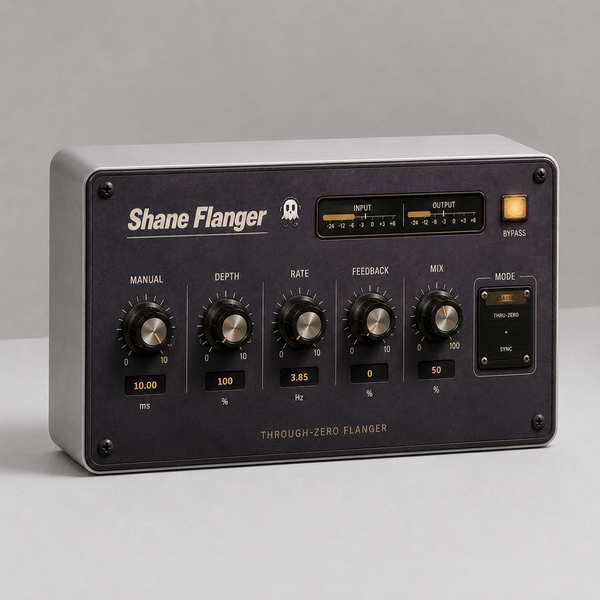
A flanger with a real through-zero mode — the two paths cross and the notch
walks straight through DC, the way it only ever happened with two tape
machines.
CONTROLS
· MODE classic, or through-zero
· MANUAL 0.1 to 10 ms — park the notch by hand
· RATE down to a crawl, up to 5 Hz, or locked to your project tempo
· DEPTH 0 to 100%
· FEEDBACK 0 to 10, positive or negative — the sign is its own control
· MIX 0 to 100%
· STEREO spread the two sides apart
· FB HIGHPASS 20 Hz to 1 kHz, so the feedback doesn't pile up in the low end
· Input and output meters, and a true bypass
The rate knob is deliberately slow at the bottom — one sweep can take well
over ten seconds.
Watch the ghost next to the logo. There are two of them, one per tap, and
they drift apart and back together as the delay between them opens and
closes. That is the flanger, drawn.
WHAT'S NEW IN 1.6
· Rebuilt, re-signed and notarized for macOS (Universal) and Windows
REGISTRATION
· The plug-in runs unrestricted for a 3-day trial from first launch.
· Your licence key is on your Gumroad receipt and on the download page.
· Paste it into the plug-in once — it needs internet that one time, then works offline.
· Message me on Gumroad if you need it reset for a new machine.
FORMATS
macOS AU + VST3 + AAX (Pro Tools), Universal (Intel + Apple Silicon)
Windows VST3 + AAX (Pro Tools), 64-bit
INSTALL — WINDOWS
1. Unzip.
2. Copy "Shane Flanger.vst3" to:
C:\\Program Files\\Common Files\\VST3
3. Restart your DAW and rescan plugins.
INSTALL — macOS
1. Open the .pkg installer and follow the prompts.
2. Pick the formats you want (VST3 / AU / AAX).
3. Restart your DAW and rescan plugins.
Signed and notarized by Apple — no Terminal, no security workaround.
The installer asks for your admin password because the plug-ins go to /Library/Audio/Plug-Ins (available to every user on the Mac).
Signed with a Developer ID and notarized by Apple — no security
warnings, no Terminal commands.
Stuck, or something sounds off? Message me — I answer every one.
More plugins coming, posted gradually.
UPDATES
Buy once, updated forever. Every future build is free to you — Gumroad emails you when there is a new one. No subscription, no upgrade fee, no re-purchase.
FOLLOW ALONG
New plugins and what goes into them: