Why use it
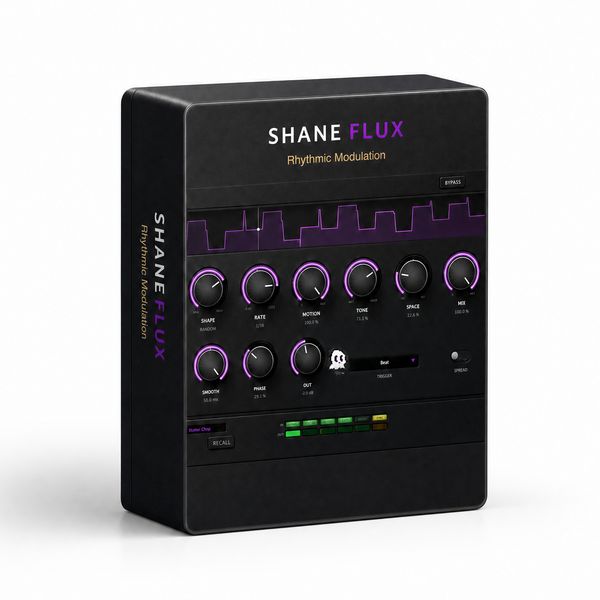
What it doesA rhythmic modulator built around a shape you draw.
Reach for it whenChopping pads and loops in time. Sidechain-style pumping without a trigger track.
What makes it differentLocks to the project tempo, with the shape deciding whether it chops, swells or scatters.
September sale: 30% off until September 30 - use code SEPT30 at checkout.
A rhythmic modulator built around a shape. Pick the movement, lock it to your
project, and it chops, swells, pumps or scatters whatever you feed it.
SHAPES
Pulse · Stutter · Swell · Pump · Random
The display up top redraws itself the moment you change it.
CONTROLS
· RATE 4 bars down to 1/32
· MOTION how far it travels
· TONE dark through to crush
· SPACE dry to far
· MIX blend it back in
· SMOOTH soften the edges of the movement
· PHASE offset where the cycle starts
· SPREAD widen it across the stereo field
· TRIGGER beat, note, or free-running
· OUT final level
PRESETS
Insert Weird · Sidechain Pump · Half-Time Swell · Stutter-Chop · Metal Comb
Alien Ring · Total Mangle · Wide Auto-Pan · Deep Space · Note Trigger Gate
Free Wobble
Watch the ghost in the middle — it's been there the whole time.
WHAT'S NEW IN 1.6
· Rebuilt, re-signed and notarized for macOS (Universal) and Windows
REGISTRATION
· The plug-in runs unrestricted for a 3-day trial from first launch.
· Your licence key is on your Gumroad receipt and on the download page.
· Paste it into the plug-in once — it needs internet that one time, then works offline.
· Message me on Gumroad if you need it reset for a new machine.
FORMATS
macOS AU + VST3 + AAX (Pro Tools), Universal (Intel + Apple Silicon)
Windows VST3 + AAX (Pro Tools), 64-bit
INSTALL — WINDOWS
1. Unzip.
2. Copy "Shane Flux.vst3" to:
C:\Program Files\Common Files\VST3
3. Restart your DAW and rescan plugins.
INSTALL — macOS
1. Open the .pkg installer and follow the prompts.
2. Pick the formats you want (VST3 / AU / AAX).
3. Restart your DAW and rescan plugins.
Signed and notarized by Apple — no Terminal, no security workaround.
The installer asks for your admin password because the plug-ins go to /Library/Audio/Plug-Ins (available to every user on the Mac).
Signed and notarized by Apple — no Terminal, no security workaround.
The installer asks for your admin password because the plug-ins go to /Library/Audio/Plug-Ins (available to every user on the Mac).
Stuck, or something sounds off? Message me — I answer every one.
More plugins coming, posted gradually.
UPDATES
Buy once, updated forever. Every future build is free to you — Gumroad emails you when there is a new one. No subscription, no upgrade fee, no re-purchase.
FOLLOW ALONG
New plugins and what goes into them: